
Getting Started with the Sisu API
This page will help you get started with the Sisu API.
Welcome to our Sisu API! 🚀
Legal
Let's get the legal stuff out of the way so that we can start building! By accessing or using the Sisu External API, or authorizing or permitting any individual to access or use the API, you are bound by the Sisu Terms of Service.
Overview
This is a RESTFUL API. You will be assigned a username:token combination. This will allow you to call our API methods that have been enabled for your platform. Each method will take in a JSON body (if required), and return JSON.
Authentication
You will be assigned a Basic Authorization username:token combination. You will be allowed to call methods that have been enabled for your team. For authentication, we use a Basic authentication scheme. The "Basic" HTTP authentication scheme is defined in RFC 7617, which transmits credentials as user ID/password pairs, encoded using base64.
Sample: Authorization: Basic bas64encoded_username:token
Additions to Authorization
To obtain your team's Authentication token, do the following:
- Visit <https://my.sisu.co/admin/api-credentials>.
- Generate your username:token pair.
- The system will identify what your Authorization token will be. This will be sent in with all requests to the API the request header “Authorization.”
For example, if your Authorization token was ABCDEF12345=, you would set the request header Authorization to Basic ABCDEF12345=.
Environments
Sisu has 3 api environments: Staging, Beta, and Production. The urls that should be used when testing API's should be as follows. They can be updated in the docs via the URL dropdown.
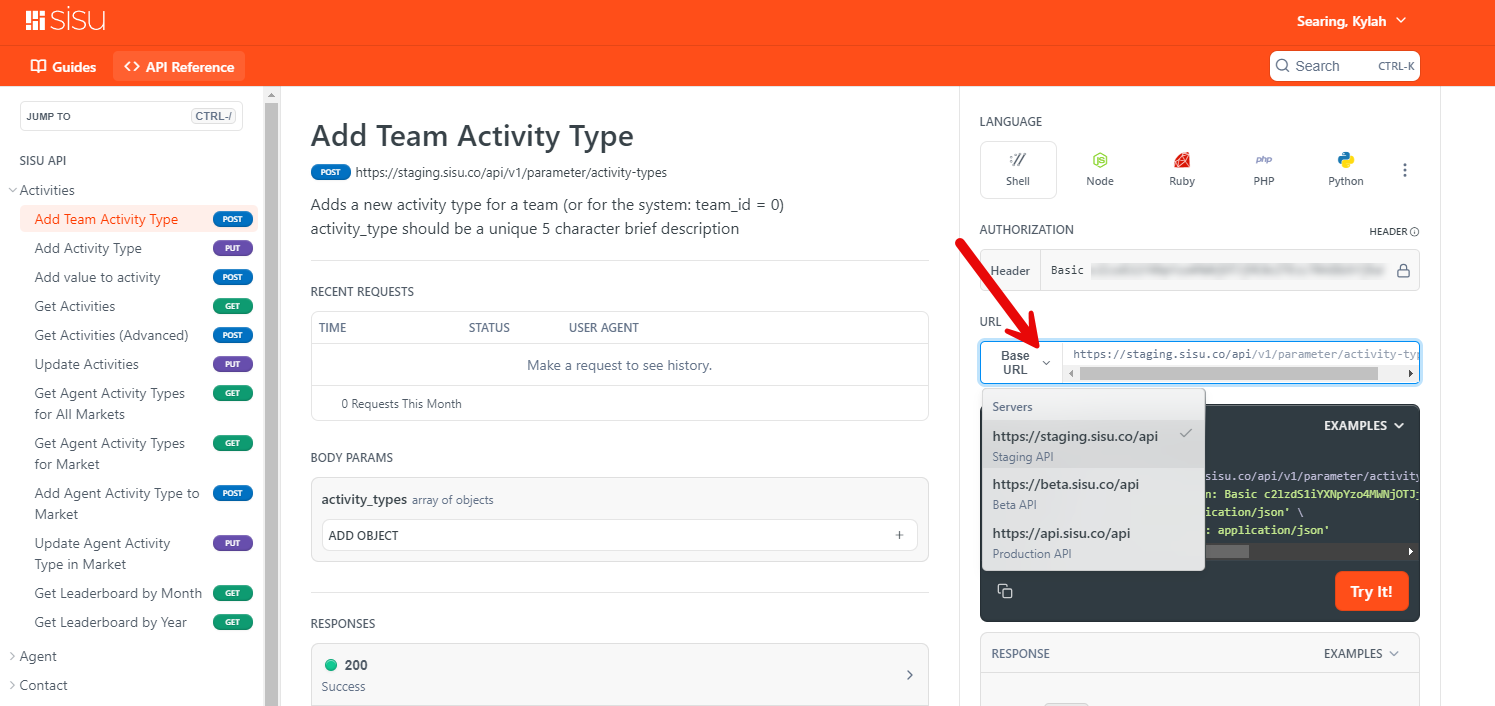
- STAGING: staging.sisu.co
- Staging is only refreshed every so often and maintains it's own database. If you want to test with this, you can verify your tests by logging in with your normal sisu credentials at https://staging.sisu.co/auth/login
- BETA: beta.sisu.co
- Beta is our pre-production environment where we test our latest features and improvements. It uses our PRODUCTION database. You can make API calls to beta and see and verify the results in your my.sisu.co account. The only advantage of using beta is if there is a bug that's been resolved, but not yet fully available in production. beta should only be used for testing and not for production workflows.
- PRODUCTION: api.sisu.co
- Production is as it sounds, our current codebase that's accessible to all users. When you send calls to api.sisu.co they affect our production database and can be seen from your my.sisu.co login.
Error Codes
Each method will return a JSON body with the following as a minimum:
{ "server_time": "2018-12-07 23:10:58", "status": "OK", "status_code": 0 }
The current error responses are somewhat non-standard and should be paid attention to carefully. Sisu returns error codes in the response body rather than as HTTP status codes. You should always check the status_code property of the response to determine if a request succeeded. A status code of 0 indicates success, while negative integers represent various failure types.
STATUS_CODE_OK: int = 0
   # general errors -1 -> -100
STATUS_CODE_ERROR: int = -1
STATUS_CODE_EXCEPTION: int = -2
STATUS_CODE_DBEXCEPTION: int = -3
STATUS_CODE_BADURL: int = -4
Object Structure
The system is contained in a relational database in the following hierarchy:
Agent: (contains relationship to team: team_id)

	Client: (contains relationship to agent: agent_id)
Transactions are contained in the client table.
Updated about 1 year ago