
Getting Started with Sisu Webhooks
This guide shows how to set up your team to receive Sisu events, such as transaction, user and task changes. Sisu publishes these events to an Amazon SNS Topic. You subscribe to that Topic with one or more URL endpoints or email addresses, and each one receives the messages.
Configuration
- In Sisu, go to Admin > Team Settings.
- In the Team Settings menu, click API Credentials/Webhooks.
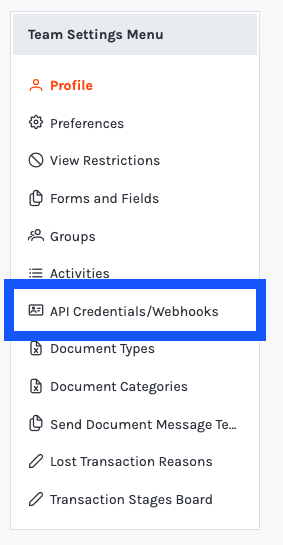
- Click Generate API Credentials to generate your credentials.
- Click Generate Webhook Topic.
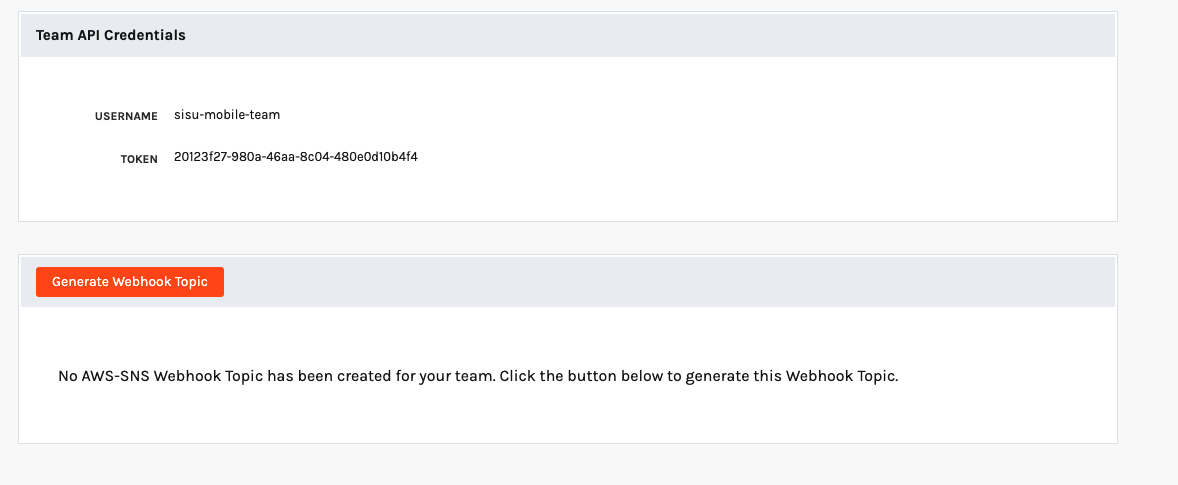
Once your Webhook Topic exists, you can subscribe endpoints to it.
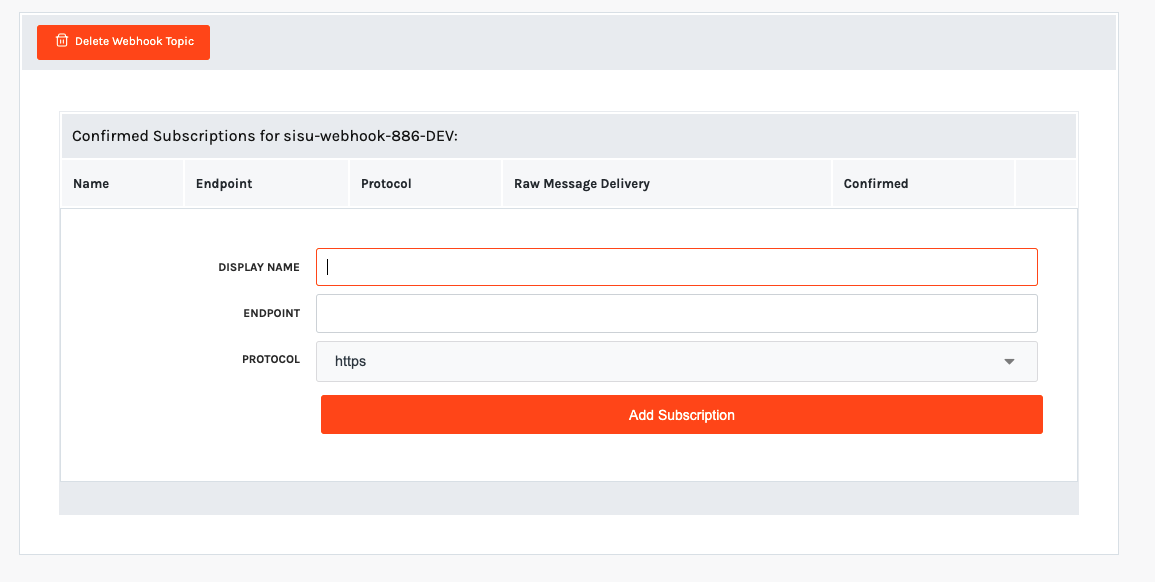
To add a subscription, enter a display name, choose a protocol and enter the endpoint:
| Protocol | Endpoint example | What happens next |
|---|---|---|
email, email-json | [email protected] | AWS emails a confirmation link. Click it to confirm the subscription. |
http, https | https://example.com/webhooks/sisu | AWS sends a SubscriptionConfirmation message to the URL, followed by Notification messages once you confirm. Your endpoint must be live before you subscribe it. See Confirming a webhook. |
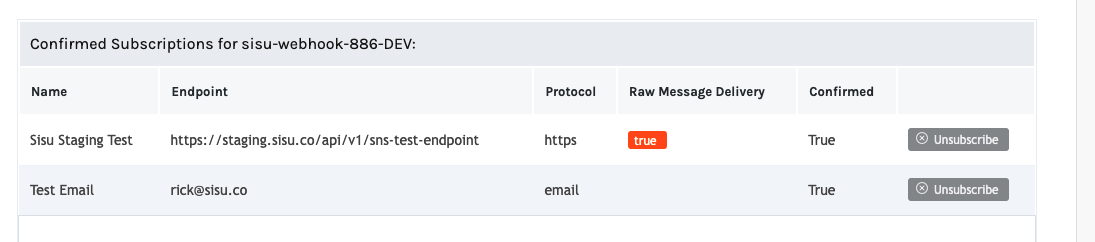
The subscriptions table lists each subscription and lets you remove it. AWS only delivers messages to confirmed subscriptions.
UsehttpsEvent payloads contain client and agent contact details. Use an
httpsendpoint for anything other than local testing.
Confirming a webhook
Before AWS delivers events to a new URL, the URL's owner has to confirm the subscription. This keeps anyone from pointing your Topic at an endpoint that doesn't expect it.
When you add a URL subscription, AWS immediately sends it a SubscriptionConfirmation message. To confirm, send an HTTP GET request to the SubscribeURL in that message. Then refresh the Sisu webhook screen to confirm the subscription shows as confirmed.
AWS deletes subscriptions that aren't confirmed within 48 hours; after that you'll need to add the subscription again. Confirmed subscriptions don't expire.
Every request AWS sends carries an x-amz-sns-message-type header (also available as the Type field in the body) with one of these values:
| Value | Meaning | What to do |
|---|---|---|
SubscriptionConfirmation | A new subscription needs confirming. | GET the SubscribeURL. |
Notification | A Sisu event or test message. | Process it. See Reading the payload. |
UnsubscribeConfirmation | The subscription was removed. | Nothing is required. |
Sample SubscriptionConfirmation request:
POST /webhooks/sisu HTTP/1.1
x-amz-sns-message-type: SubscriptionConfirmation
x-amz-sns-message-id: cd5f3f8c-1a04-42f9-8877-e69f1ca6f17a
x-amz-sns-topic-arn: arn:aws:sns:us-west-2:033563632468:sisu-webhook-886
Content-Type: text/plain; charset=UTF-8
User-Agent: Amazon Simple Notification Service Agent

{
  "Type": "SubscriptionConfirmation",
  "MessageId": "cd5f3f8c-1a04-42f9-8877-e69f1ca6f17a",
  "Token": "2336412f37fb...",
  "TopicArn": "arn:aws:sns:us-west-2:033563632468:sisu-webhook-886",
  "Message": "You have chosen to subscribe to the topic arn:aws:sns:us-west-2:033563632468:sisu-webhook-886.\nTo confirm the subscription, visit the SubscribeURL included in this message.",
  "SubscribeURL": "https://sns.us-west-2.amazonaws.com/?Action=ConfirmSubscription&TopicArn=...&Token=...",
  "Timestamp": "2021-10-18T16:46:13.999Z",
  "SignatureVersion": "1",
  "Signature": "EXAMPLE...",
  "SigningCertURL": "https://sns.us-west-2.amazonaws.com/SimpleNotificationService-....pem"
}
Test Message
Once you have at least one confirmed subscription, you can send a test message from the webhook screen.
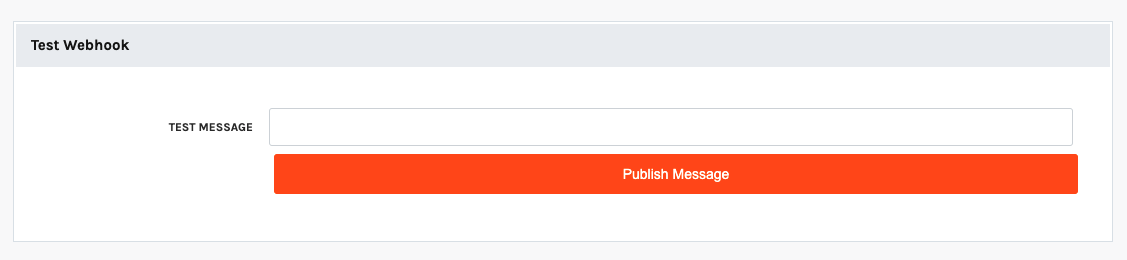
The test message is published as this JSON object:
{
  "test_message": "Test Message"
}
Like any other notification, it may arrive wrapped in an SNS envelope. See Reading the payload.
Setting Up Event Triggers
Once your subscriptions are confirmed, add triggers to choose which events Sisu publishes to your Topic. Every confirmed subscription on the Topic receives every triggered event.
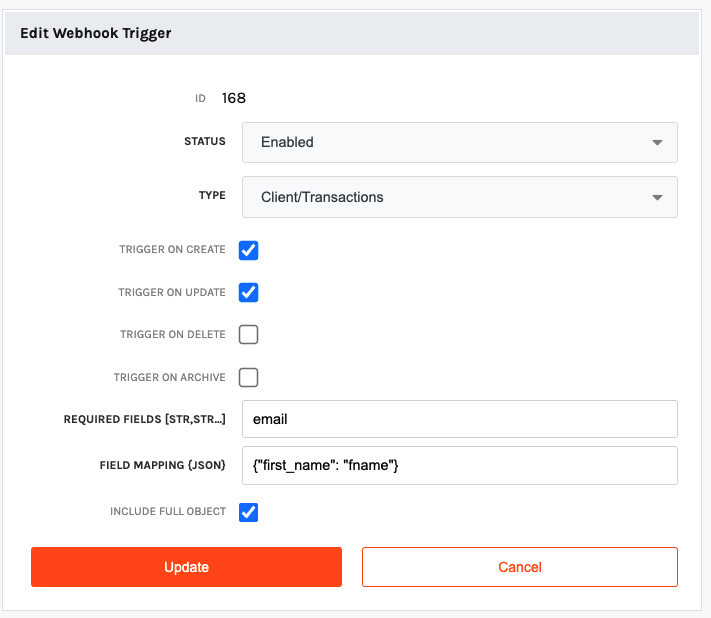
Event types
| Trigger | model in payload | Primary key | Create | Update | Delete | Archive |
|---|---|---|---|---|---|---|
| Client/Transactions | Client | client_id | Yes | Yes | Yes | Yes |
| Agent/User | Agent | agent_id | Yes | Yes | Yes | Yes |
| Task | ClientTask | task_id | Yes | Yes | Yes | Yes |
| Check In | AiCheckinLog | log_id | Yes | Yes | Yes | No |
| Custom Field | TeamCustomClientField | team_custom_client_field_id | Yes | Yes | Yes | No |
The Custom Field trigger fires when a custom field definition is created, edited or deleted, including when its options are added, renamed or removed. A change to a custom field's value on a transaction is a Client update. See Custom field values.
Trigger options
| Option | Description |
|---|---|
| Trigger on Create / Update / Delete / Archive | Which actions publish an event. |
| Include Full Object | Adds the record's current state as object_data.full_object. |
| Use ISO date/time format | Sends dates and times in ISO 8601 format instead of the default format. Recommended for new integrations. See Dates and times. |
Filtering events
A trigger selects events by type and action only. It can't filter on field values, so filter events in your own code or integration platform. Enable Include Full Object if you need fields that didn't change: updated_values only contains the fields that changed.
Reading the payload
A notification's request body takes one of two shapes, depending on the subscription:
- The Sisu event payload itself.
- An SNS
Notificationenvelope. The Sisu event payload is a JSON-encoded string in the envelope'sMessagefield, so you need to parse it a second time.
Bodies are sent as Content-Type: text/plain, so parse the request body as JSON yourself, rather than relying on a framework's JSON body parser. Handle both shapes, as in these examples:
import json

import requests


def handle_sisu_webhook(headers, raw_body: bytes):
    # Header lookups must be case-insensitive (Flask and Django headers already are).
    message_type = headers.get("x-amz-sns-message-type")
    body = json.loads(raw_body)

    if message_type == "SubscriptionConfirmation":
        requests.get(body["SubscribeURL"], timeout=10)
        return
    if message_type != "Notification":
        return

    # SNS envelope: the Sisu payload is a JSON string in "Message".
    if body.get("Type") == "Notification" and "Message" in body:
        body = json.loads(body["Message"])

    if "test_message" in body:
        return

    for change in body["data_objects"]:
process_change(body["model"], body["action"], change)// Use a raw/text body parser for this route, e.g. express.text({ type: "*/*" }).
async function handleSisuWebhook(req, res) {
const messageType = req.get("x-amz-sns-message-type");
let body = JSON.parse(req.body);
if (messageType === "SubscriptionConfirmation") {
await fetch(body.SubscribeURL);
return res.sendStatus(200);
}
if (messageType !== "Notification") return res.sendStatus(200);
// SNS envelope: the Sisu payload is a JSON string in "Message".
if (body.Type === "Notification" && "Message" in body) {
body = JSON.parse(body.Message);
}
if (!("test_message" in body)) {
for (const change of body.data_objects) {
processChange(body.model, body.action, change);
}
}
res.sendStatus(200);
}Delivery behavior
- Respond with a
2xxstatus quickly, and do slow work after responding. AWS retries deliveries that time out or receive a5xxresponse. - AWS can deliver the same message more than once, and doesn't guarantee order. Use the envelope's
MessageId(or thex-amz-sns-message-idheader) to drop duplicates, and comparefull_object.updated_tsif order matters. - To verify that a request came from AWS, check its signature using the
SignatureandSigningCertURLfields. See Verifying the signatures of Amazon SNS messages.
Sample notification (SNS envelope)
POST /webhooks/sisu HTTP/1.1
x-amz-sns-message-type: Notification
x-amz-sns-message-id: 7d1541ca-bde6-5be1-b2bb-228b41f641a7
x-amz-sns-topic-arn: arn:aws:sns:us-west-2:033563632468:sisu-webhook-886
x-amz-sns-subscription-arn: arn:aws:sns:us-west-2:033563632468:sisu-webhook-886:b9a58780-ca86-4206-b22e-cd0456a22c52
Content-Type: text/plain; charset=UTF-8
User-Agent: Amazon Simple Notification Service Agent

{
  "Type": "Notification",
  "MessageId": "7d1541ca-bde6-5be1-b2bb-228b41f641a7",
  "TopicArn": "arn:aws:sns:us-west-2:033563632468:sisu-webhook-886",
  "Message": "{\"bulk_guid\": \"519e9a9d-fc8a-4463-b4b7-4095b3357556\", \"acs_id\": 168, \"model\": \"Client\", \"action\": \"update\", ...}",
  "Timestamp": "2026-10-08T20:15:12.296Z",
  "SignatureVersion": "1",
  "Signature": "EXAMPLE...",
  "SigningCertURL": "https://sns.us-west-2.amazonaws.com/SimpleNotificationService-....pem",
  "UnsubscribeURL": "https://sns.us-west-2.amazonaws.com/?Action=Unsubscribe&SubscriptionArn=..."
}
When the payload isn't wrapped in an envelope, the request body is the decoded value of Message, shown in full in the next section.
Payload reference
Top-level fields
| Field | Type | Description |
|---|---|---|
bulk_guid | string | Identifies the change. Every field changed in a single save shares one bulk_guid. |
acs_id | integer or null | ID of the trigger that produced the event. |
model | string | The record type: one of the model values in Event types. |
action | string | insert, update, delete or archive. |
team_id | integer | The Sisu team the record belongs to. |
organization_id | integer | Only present on events delivered to an organization-level Topic. |
data_objects | array | The changes in this event. Currently there's always exactly one element, but iterate over it as an array. |
data_objects[]
data_objects[]| Field | Type | Description |
|---|---|---|
previous_values | object | Each changed field's value before the change. On insert, every field is null. |
updated_values | object | Each changed field's new value. Only fields that changed are included. |
required_values | object | The record's primary key, such as {"client_id": 1812799}. Always present, whether or not it changed. |
object_data | object | Describes the record and the change. See below. |
object_data
object_data| Field | Type | Description |
|---|---|---|
model | string | Same as the top-level model. |
table | string | Sisu's name for the record type, such as client or agent. |
action | string | Same as the top-level action. |
pkey | string | The name of the primary key field, such as client_id. |
guid | integer | The primary key value of the changed record. |
change_data | object | Who made the change and where. See below. |
full_object | object | Only present when Include Full Object is enabled. The record's current field values, with this change applied. Fields whose value is empty (null, "", 0 or false) are left out, so treat a missing key as empty. Not present when the record no longer exists, which can happen on delete. |
tags | object | Client events only. The transaction's tags, keyed by tag ID: {"412": {"name": "VIP", "color": "#1F6FEB", "font_color": "#FFFFFF"}}. Empty ({}) when there are no tags. |
agent_record | object | Client events only, when the transaction has an agent. Contains agent_id, first_name, last_name, full_name, email and mobile_phone. |
change_data
change_data| Field | Type | Description |
|---|---|---|
changed_by_agent_id | integer | The Sisu user who made the change, or on whose behalf an API call made it. Absent or 0 when Sisu automation made the change. |
type | string | Who made the change. Always present. See Change source. |
client | string | The browser user agent, when the change was made from a browser. |
data_from | string | A short description of where in Sisu the change originated. It's informational only and may change at any time, so don't build logic on it. |
Change source
change_data.type tells you whether a person made the change or an integration did. Use it, for example, to skip events your own integration caused so you don't sync them back.
type | Meaning |
|---|---|
w | A user signed in to Sisu made the change, on the web or in the mobile app. |
a | An API call made the change, using an API key or an OAuth app. This includes your own integration's calls. |
i | An API call that identified its integration with the integration-name request header. Treat it the same as a. |
u | Sisu made the change automatically, for example a scheduled job or an automation rule. |
er | An e-signature request completed and updated the record. |
New codes may be added, so handle unrecognized values gracefully.
Dates and times
By default, dates and times are sent in RFC 1123 format, for example "Fri, 09 Oct 2026 00:00:00 GMT". In this format, seconds are always 00.
When Use ISO date/time format is enabled, they're sent in ISO 8601 format:
- Date fields (names ending in
_dt, such asclosed_dtandlead_dt) are calendar dates, such as"2026-08-18". Some date fields are sent with a midnight time, such as"2026-10-09T00:00:00". In either case, use only the date part. - Timestamp fields (names ending in
_ts, such ascreated_tsandupdated_ts) include fractional seconds and have no UTC offset, such as"2026-10-08T20:15:11.954492". Interpret them as UTC.
Transaction fields
Client events use Sisu's field names as keys. These are the most commonly used, with the labels a real estate team sees in Sisu:
| Field | Sisu label | Notes |
|---|---|---|
client_id | The transaction's ID. | |
type_id | Transaction Type | s is a seller (listing) and b is a buyer. |
status | N is active and D is archived. An archived transaction is sent with action archive. | |
pipeline_status | The transaction's stage in words, such as Pending or Closed. | |
client_stage_id | Transaction Stage | The ID of one of the team's stages. |
first_name, last_name, full_name | First Name, Last Name | The client's name. full_name is only in full_object. |
email, mobile_phone | Contact Email, Mobile Phone Number | The client's contact details. |
agent_id | The transaction's agent. object_data.agent_record has the agent's name and contact details. | |
tc_agent_id | TC | The transaction coordinator. |
address_1, address_2 | Address Line 1, Address Line 2 | The property's street address. |
city, state, postal_code, county | City, State, Postal Code, County | state is a two-letter code. |
mls_id, mls_status | MLS ID, MLS Status | |
property_type, property_sqft, year_built | Property Type, Property Square Footage, Year Built | |
listing_amt | Listing Amount | The list price. |
listing_dt | MLS Live Date | |
target_list_dt | Target List Date | |
listing_agreement_end_dt | Listing Expiration Date | |
trans_amt | Transaction Amount | The sale price. |
lead_type_id | Lead Source | The ID of one of the team's lead sources. |
lead_dt, appt_set_dt, appt_dt | Lead Date, 1st Time Appt Set, 1st Time Appt Met | |
signed_dt, uc_dt, closed_dt, forecasted_closed_dt | Signed Date, Under Contract Date, Closed (Settlement) Date, Forecasted Closed Date | |
gross_commission_amt, gci_pct | GCI, GCI % | |
custom | The team's custom field values. See Custom field values. |
Labels differ between markets (a mortgage team sees trans_amt as "Loan Amount", for example), and every team has its own custom fields. For the complete list of fields as a specific team sees them, including custom fields and their options, call Get Team Fields (GET /v1/team/fields) with that team's API credentials. Each entry's field_name is the key used in webhook payloads.
Custom field values
A transaction's custom field values live in the custom object, keyed by the custom field's field_name. In previous_values and updated_values, custom contains only the custom fields that changed:
"previous_values": { "custom": { "referral_partner": null } },
"updated_values":  { "custom": { "referral_partner": "Jane Doe" } }
custom can appear as an empty object ({}) alongside other changes. That means no custom field value changed, and you can ignore it.
Sample payloads
Client/Transaction insert
This sample has Include Full Object and Use ISO date/time format enabled. previous_values has the same keys as updated_values, mostly null; it's abridged here.
{
  "bulk_guid": "3c0f1e7a-2b9d-4f61-9a55-0d6b8e4c2a17",
  "acs_id": 168,
  "model": "Client",
  "action": "insert",
  "team_id": 886,
  "data_objects": [
    {
      "previous_values": {
        "client_id": null,
        "type_id": null,
        "address_1": null,
        "listing_amt": null
      },
      "updated_values": {
        "client_id": 1812800,
        "type_id": "s",
        "first_name": "Jordan",
        "last_name": "Seller",
        "email": "[email protected]",
        "mobile_phone": "8015550142",
        "agent_id": 3384,
        "status": "N",
        "pipeline_status": "Signed",
        "client_stage_id": 35460,
        "address_1": "123 Main St",
        "city": "Salt Lake City",
        "state": "UT",
        "postal_code": "84101",
        "county": "Salt Lake",
        "property_type": "Single Family",
        "listing_amt": 625000.0,
        "target_list_dt": "2026-10-20",
        "listing_agreement_end_dt": "2027-04-20",
        "signed_dt": "2026-10-08",
        "lead_type_id": 14,
        "custom": {
          "listing_photographer": "Booked"
        }
      },
      "required_values": {
        "client_id": 1812800
      },
      "object_data": {
        "model": "Client",
        "table": "client",
        "action": "insert",
        "pkey": "client_id",
        "guid": 1812800,
        "change_data": {
          "type": "w",
          "client": "Mozilla/5.0 (Macintosh; Intel Mac OS X 10_15_7) AppleWebKit/537.36 (KHTML, like Gecko) Chrome/141.0.0.0 Safari/537.36",
          "changed_by_agent_id": 3384
        },
        "tags": {},
        "agent_record": {
          "agent_id": 3384,
          "first_name": "Alex",
          "last_name": "Agent",
          "full_name": "Alex Agent",
          "email": "[email protected]",
          "mobile_phone": "8015550100"
        },
        "full_object": {
          "client_id": 1812800,
          "type_id": "s",
          "first_name": "Jordan",
          "last_name": "Seller",
          "full_name": "Jordan Seller",
          "email": "[email protected]",
          "mobile_phone": "8015550142",
          "agent_id": 3384,
          "status": "N",
          "pipeline_status": "Signed",
          "client_stage_id": 35460,
          "address_1": "123 Main St",
          "city": "Salt Lake City",
          "state": "UT",
          "postal_code": "84101",
          "county": "Salt Lake",
          "property_type": "Single Family",
          "listing_amt": 625000.0,
          "target_list_dt": "2026-10-20",
          "listing_agreement_end_dt": "2027-04-20",
          "signed_dt": "2026-10-08",
          "lead_type_id": 14,
          "custom": {
            "listing_photographer": "Booked"
          },
          "created_ts": "2026-10-08T21:04:17.120334",
          "updated_ts": "2026-10-08T21:04:17.120334"
        }
      }
    }
  ]
}
Client/Transaction update
This sample has Include Full Object and Use ISO date/time format enabled. The transaction moved to a new stage and gained a closing date.
{
  "bulk_guid": "519e9a9d-fc8a-4463-b4b7-4095b3357556",
  "acs_id": 168,
  "model": "Client",
  "action": "update",
  "team_id": 886,
  "data_objects": [
    {
      "previous_values": {
        "closed_dt": null,
        "custom": {},
        "client_stage_id": 39481
      },
      "updated_values": {
        "closed_dt": "2026-10-09T00:00:00",
        "custom": {},
        "client_stage_id": 35462
      },
      "required_values": {
        "client_id": 1812799
      },
      "object_data": {
        "model": "Client",
        "table": "client",
        "action": "update",
        "pkey": "client_id",
        "guid": 1812799,
        "change_data": {
          "type": "w",
          "client": "Mozilla/5.0 (Macintosh; Intel Mac OS X 10_15_7) AppleWebKit/537.36 (KHTML, like Gecko) Chrome/141.0.0.0 Safari/537.36",
          "data_from": "transactions.pwa_transaction - client.set",
          "changed_by_agent_id": 3384
        },
        "tags": {},
        "agent_record": {
          "agent_id": 3384,
          "first_name": "Alex",
          "last_name": "Agent",
          "full_name": "Alex Agent",
          "email": "[email protected]",
          "mobile_phone": "8015550100"
        },
        "full_object": {
          "client_id": 1812799,
          "contact_id": 35651368,
          "agent_id": 3384,
          "tc_agent_id": 146532,
          "related_team_id": 886,
          "type_id": "s",
          "first_name": "Test",
          "last_name": "Client",
          "full_name": "Test Client",
          "email": "[email protected]",
          "mobile_phone": "8015550199",
          "status": "N",
          "pipeline_status": "Pending",
          "client_stage_id": 35462,
          "board_sort_order": 26,
          "lead_type_id": 14,
          "lead_dt": "2026-08-18",
          "appt_set_dt": "2026-06-03",
          "appt_dt": "2026-06-12",
          "signed_dt": "2026-08-07",
          "uc_dt": "2026-08-18",
          "closed_dt": "2026-10-09T00:00:00",
          "financing": "Conventional",
          "orig_trans_amt": 850000.0,
          "trans_amt": 850000.0,
          "gci_pct": 3.0,
          "gross_commission_amt": 25500.0,
          "commission_amt": 12750.0,
          "split_pct": 50.0,
          "team_split_pct": 50.0,
          "created_ts": "2026-08-18T13:43:48.763270",
          "updated_ts": "2026-10-08T20:15:11.954492"
        }
      }
    }
  ]
}
Agent/User insert
This sample has Include Full Object enabled and uses the default date format. previous_values, updated_values and full_object are abridged.
{
  "bulk_guid": "b7ebfb48-0078-4eb1-8fa5-767f55646b37",
  "acs_id": 143,
  "model": "Agent",
  "action": "insert",
  "team_id": 886,
  "data_objects": [
    {
      "previous_values": {
        "agent_id": null,
        "first_name": null,
        "last_name": null,
        "mobile_phone": null,
        "email": null,
        "status": null,
        "start_dt": null
      },
      "updated_values": {
        "agent_id": 76395,
        "first_name": "New",
        "last_name": "User",
        "mobile_phone": "8015551234",
        "email": "[email protected]",
        "status": "N",
        "start_dt": "Thu, 13 Jan 2022 00:00:00 GMT"
      },
      "required_values": {
        "agent_id": 76395
      },
      "object_data": {
        "model": "Agent",
        "table": "agent",
        "action": "insert",
        "pkey": "agent_id",
        "guid": 76395,
        "change_data": {
          "type": "w",
          "client": "Mozilla/5.0 (Macintosh; Intel Mac OS X 10_15_7) AppleWebKit/537.36 (KHTML, like Gecko) Chrome/141.0.0.0 Safari/537.36",
          "changed_by_agent_id": 3384
        },
        "full_object": {
          "agent_id": 76395,
          "first_name": "New",
          "last_name": "User",
          "full_name": "New User",
          "email": "[email protected]",
          "archived_email": "[email protected]",
          "mobile_phone": "8015551234",
          "status": "N",
          "start_dt": "Thu, 13 Jan 2022 00:00:00 GMT",
          "created_ts": "Thu, 13 Jan 2022 17:33:00 GMT"
        }
      }
    }
  ]
}
Agent/User update
Only the fields that changed appear in previous_values and updated_values. This sample has Include Full Object disabled.
{
  "bulk_guid": "4bd24f33-7fde-436d-a926-08d6849d81de",
  "acs_id": 143,
  "model": "Agent",
  "action": "update",
  "team_id": 886,
  "data_objects": [
    {
      "previous_values": {
        "first_name": "New",
        "last_name": "User"
      },
      "updated_values": {
        "first_name": "NewUPDATE",
        "last_name": "UserUPDATE"
      },
      "required_values": {
        "agent_id": 76395
      },
      "object_data": {
        "model": "Agent",
        "table": "agent",
        "action": "update",
        "pkey": "agent_id",
        "guid": 76395,
        "change_data": {
          "type": "w",
          "client": "Mozilla/5.0 (Macintosh; Intel Mac OS X 10_15_7) AppleWebKit/537.36 (KHTML, like Gecko) Chrome/141.0.0.0 Safari/537.36",
          "changed_by_agent_id": 3384
        }
      }
    }
  ]
}
Agent/User archive
Archiving a user sets status from N to D, and is sent with action archive.
{
  "bulk_guid": "e3cf542a-6652-4436-92e1-56961a1fd9a7",
  "acs_id": 143,
  "model": "Agent",
  "action": "archive",
  "team_id": 886,
  "data_objects": [
    {
      "previous_values": {
        "status": "N"
      },
      "updated_values": {
        "status": "D"
      },
      "required_values": {
        "agent_id": 76395
      },
      "object_data": {
        "model": "Agent",
        "table": "agent",
        "action": "archive",
        "pkey": "agent_id",
        "guid": 76395,
        "change_data": {
          "type": "u"
        }
      }
    }
  ]
}
Custom Field update (option added)
When a custom field's options change, previous_values.options and updated_values.options contain the field's complete option list before and after the change, keyed by option ID. An option's status is N when active and D when removed. This sample has Include Full Object disabled and uses the default date format.
{
  "bulk_guid": "0f3b6c1e-55a2-4d1b-9a3e-6d1f2b7c9e40",
  "acs_id": 917,
  "model": "TeamCustomClientField",
  "action": "update",
  "team_id": 886,
  "data_objects": [
    {
      "previous_values": {
        "options": {
          "0": { "name": "Red", "status": "N", "is_enabled": "Y" }
        },
        "modified_ts": "Mon, 05 Oct 2026 16:42:00 GMT"
      },
      "updated_values": {
        "options": {
          "0": { "name": "Red", "status": "N", "is_enabled": "Y" },
          "1": { "name": "Blue", "status": "N", "is_enabled": "Y" }
        },
        "modified_ts": "Thu, 08 Oct 2026 20:10:00 GMT"
      },
      "required_values": {
        "team_custom_client_field_id": 5521
      },
      "object_data": {
        "model": "TeamCustomClientField",
        "table": "team_custom_client_field",
        "action": "update",
        "pkey": "team_custom_client_field_id",
        "guid": 5521,
        "change_data": {
          "type": "w",
          "data_from": "TeamCustomClientField.set_options",
          "changed_by_agent_id": 3384
        }
      }
    }
  ]
}
A custom field's team_custom_client_field_id never changes, so use it to match update and delete events to a field you already know about. With Include Full Object enabled, full_object.field_name gives the field's name on insert and update events. That name is the key used in a transaction's custom object.
Updated 9 days ago